
Time tracking
Log time by calendar or live timer
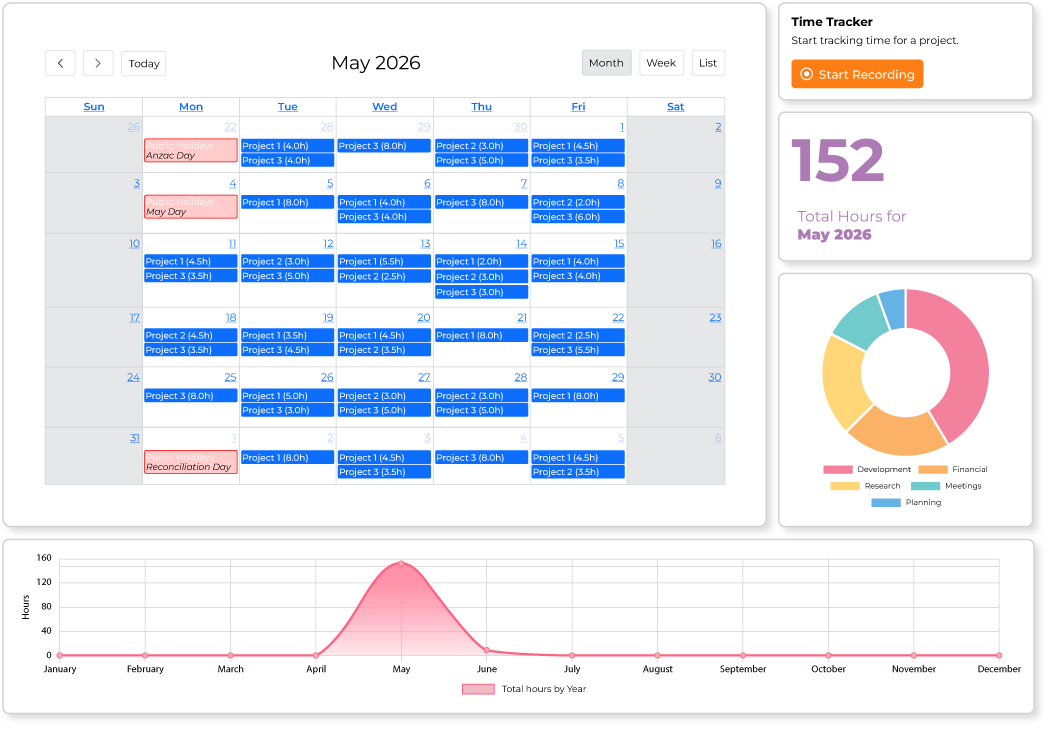
Enter hours directly on the calendar or use the live timer while you work. Both methods feed the same timesheet, giving employees flexibility and managers consistent time data across projects.
How it works
Two ways to log the same accurate hours
Some people prefer to fill in their calendar at the end of the day; others want a timer running while they work. SyncroTask supports both without splitting the data into two systems, so managers always see one consistent timesheet per person.
- Visual calendar for daily time entries
- One-click live timer with automatic logging
- Timers running past a preset time limit are automatically flagged, with a save-or-discard prompt at your next login
- Track time across multiple projects and activities each day
- Copy the previous day's entries in one click when the work repeats
- Dashboard charts show total hours by year and by project, plus your running total for the current month
- Optional worklog reminder emails for anyone who hasn't logged time in a while
- Generate timesheets and export them to CSV
FAQ
Time tracking questions
A running timer is automatically capped after a preset time limit. The next time you log in, you'll see a prompt to save or discard that entry, so it never sits ambiguously on your timesheet.
Yes. Track time across multiple projects and activities each day, either on the calendar or with the live timer. When you worked on the same thing the day before, you can copy the previous day's entries into today with one click instead of re-entering them.
Yes. Time logged by calendar or timer feeds the same timesheet, which you can filter by user, team, project or date range and export to CSV. See the reporting page for details.
Explore more
Other SyncroTask features
Start your 14-day free trial today
Track time, manage leave and explore reporting with every SyncroTask feature included. No credit card required, and nothing to cancel if it's not the right fit.
Start 14-day free trial14 days free · No credit card · Every feature included